
WHC Dock Scheduling System
Delivery and collection appointments that your business partners enter for you. You go live in 5 days, we take care of the configuration, and AI helps with data migration and running the process.
No card, no commitment — the DEMO opens in your browser within seconds.
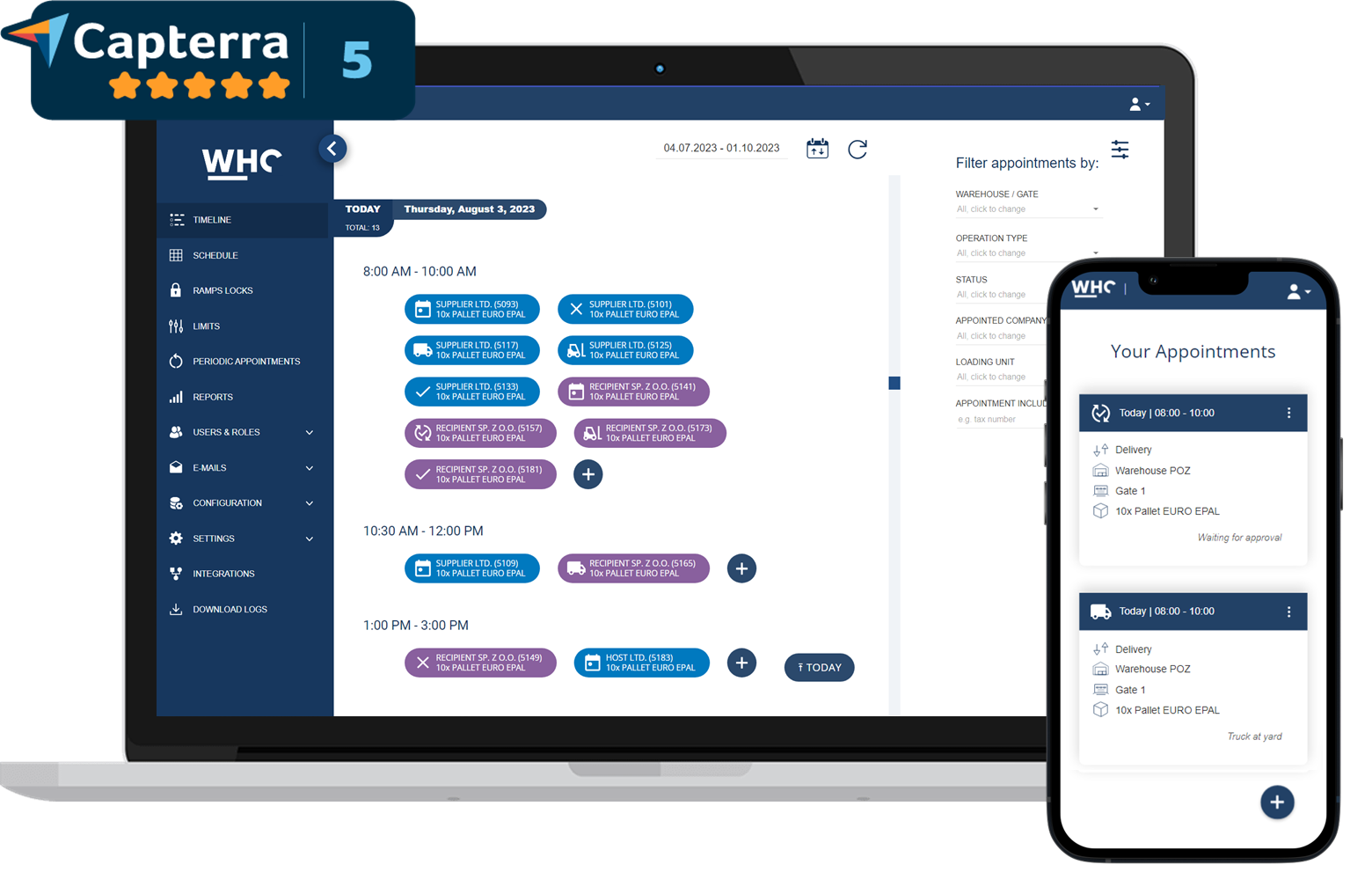



Live in 5 days, not in five months
You know the pattern from other IT projects: analysis, budget, a queue in the IT department, a quarter before go-live. Not here. WHC runs in the browser, and we count the rollout in working days — after a week your first business partners are booking slots in your calendar.
We learn your process
A short online call: how many sites and docks you have, how your shifts work, who schedules transport today and what hurts most.
We set up your instance
A separate environment with your logo, warehouses, dock doors and time slots that mirror your real working hours.
We load your data
Import of business partners and current appointments, load units, limits and status workflows for your types of operations.
We train your team
Remote training for logistics, warehouse and security staff. We set up notifications, roles and user permissions.
You go live with your partners
We send invitations and guides to your suppliers and carriers. The first appointments land in the schedule.
What the WHC Dock Scheduling System does
Instead of e-mails, phone calls and a spreadsheet — one online schedule where your business partners book their own time slots for unloading and loading.
-
1
You send partners a link
Suppliers, carriers and customers get access to your schedule. No installation — everything runs in the browser.
-
2
Your partner books a slot
They pick an available time and fill in the load and driver details. The system enforces limits and free docks.
-
3
The warehouse works to plan
One real-time calendar for logistics, security and the docks. No file versions, no overwrites.
If you leave — you get 100% of your data back, at no extra cost
We do not lock you in. At any time you can export every appointment, business partner and operations history to Excel or pull it through the REST API. When the licence period ends, we return the full set of data created in the WHC Dock Scheduling System — with no extra fees and no “buy-out” procedure. That means you can move to another tool whenever you choose, or keep the data on your side.
- Export on demand — Excel or API, whenever you want
- 100% of operational data after cancellation, with no hidden costs
- Easy migration to another tool at any moment
We configure the system for you — in 5 days
You are not handed an empty tool with a "set it up yourself" manual. Before you even see your instance, our team loads the reality of your warehouse into it. All you do is review it and tell us what to correct.
- We'll create business partner accounts for you — in bulk, even hundreds of suppliers and carriers.
- We'll import your current appointments for you — from the spreadsheet into the system, no retyping.
- We'll set up warehouses, dock doors and bays for you — with working hours for each site.
- We'll configure time slots and limits for you — by day, hour, business partner and dock.
- We'll add load units for you — pallets, containers and parcels with operation time.
- We'll prepare notifications, statuses and your logo for you — e-mail/SMS templates and your brand identity.
- We'll train your team for you — including security and warehouse staff.
The result: your team gets a working tool, not another project to manage.
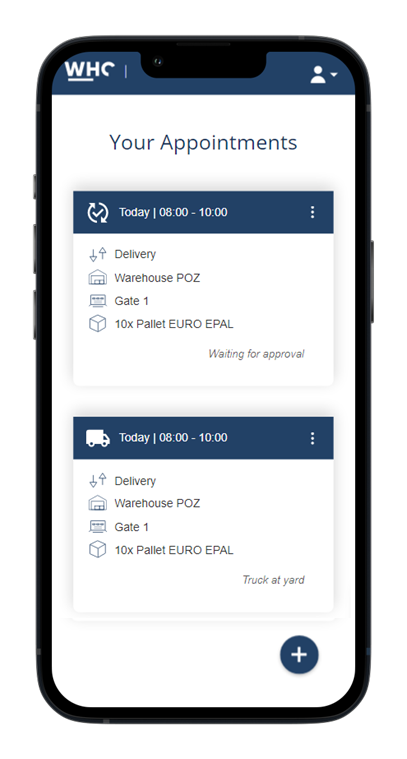
Your suppliers genuinely use it
The biggest risk when rolling out dock scheduling is not the technology, but the people at the other end of the chain. If the form is heavy, the freight forwarder goes back to the phone. That is why we designed the business partner view first, not last.
- An appointment in 1–3 minutes, including from a phone in the yard or in the cab.
- No training needed — your partner only sees available slots and the fields they actually have to complete.
- Interface language detected automatically (English, Polish, and more if you need them).
- Ready-made online guides for suppliers, customers, carriers and freight forwarders — just send the link.
- PIN and QR code in the e-mail, so the driver confirms arrival without any explaining at the gate.
- New partner registration can be self-service, or stay entirely on your side.
Appointments are entered by your partners, not by your people
The most expensive part of dock scheduling is your employees' time: answering calls, copying data out of e-mails, keeping track of which file version is current. WHC flips that around — booking becomes the responsibility of whoever is arriving.
Life without a system
- A shared "bookings@" inbox and dozens of e-mails to copy into the calendar by hand.
- Calls from drivers and freight forwarders, usually in the middle of more urgent work.
- A spreadsheet in several versions, where someone has just overwritten another person's entry.
- Nobody knows who moved a delivery time, or who asked for it.
- One person's holiday can bring the whole flow of information to a halt.
Life with the WHC Dock Scheduling System
- Your business partner gets a link, picks an available slot and enters the load and driver details.
- You decide whether an appointment needs approval — accept or reject it in one click.
- One schedule in real time, with no versions, copies or overwrites.
- Every change carries an author and a timestamp, so "who moved this?" stops being a question.
- The process keeps running regardless of who happens to be at work that day.
The WHC Delivery Scheduling System spreads traffic across the whole day
Five trucks at the gate at 8 a.m. and empty docks in the afternoon is not bad luck — it is the lack of a tool to spread the traffic. WHC protects your warehouse capacity for you, before the driver even sets off.
Time slots in two modes
In STATIC mode an appointment takes up a whole slot and you set capacity with limits. In DYNAMIC mode the operation time is calculated from the size of the load, and you move appointments by drag and drop with minute-level precision — with no risk of two operations overlapping on the same dock.
You set the rhythm of the warehouse, not the order in which trucks turn up.Limits on several levels
You set rules in the language of your operation: a maximum number of appointments per day, a number of pallets in a given slot, how many times a single business partner may arrive on one day, or the utilisation of an individual dock. The system rejects excess bookings automatically, without your involvement.
The warehouse never takes on more work than it can handle.Automatic dock assignment
The load balancer assigns new appointments to the least busy dock doors, so work is spread evenly across teams and bays. Recurring appointments for regular suppliers are created by the system itself, so a repeating schedule costs nobody any time.
Even workload across all docks, with zero manual rota building.What changes in the numbers you report
- Shorter turnaround time per vehicle, because the truck pulls up to a dock that is already prepared.
- Fewer waiting times and detention charges — drivers do not queue.
- Stable workload per shift, which makes it easier to plan people, holidays and stocktakes.
- Fewer mistakes and less improvisation, because every transport has a known place and time in advance.
A short walkthrough: what working with the WHC schedule looks like
Dock appointments supported by artificial intelligence
AI is not a slide title here. We use it where it genuinely takes work off people's hands: in data migration, in language versions and in how your systems talk to WHC.
AI reads your files
You upload an Excel or CSV file in whatever format you happen to have. The model analyses the headers and sample values, then maps the columns to system fields itself — even when every business partner names them differently.
Data import without hours of manual column mapping.AI keeps language versions in line
You add a new operation type, status or field description in your own language, and the system suggests the English equivalent in proper logistics terminology. Foreign carriers see a consistent interface, even though nobody maintains a translation glossary.
A multilingual system with no translator involved.AI agents book through the API
The REST API documented to the OpenAPI standard is readable not only by developers, but also by AI assistants. A freight forwarder's agent can create an appointment straight from a transport order, and a chatbot can tell a driver which dock and time to report to — at any hour and in any language.
Your logistics team stops answering the same questions over and over.The model runs in Europe
The AI features run on models hosted in European cloud infrastructure, not on accounts with providers outside the EU. Usage is logged inside the system, so it is always clear what was processed and when.
An argument that gets through your IT and compliance teams.The system adapts to your process, not the other way round
A warehouse attached to a production line, a distribution centre and a logistics operator all work differently. Instead of forcing everyone into one template, WHC lets you reproduce the process that already works for you.
Custom operation types and status workflows
Beyond deliveries and collections you can define any warehouse event — waste collection, a service visit, a cross-dock transfer. Each type can have its own form, its own set of required data and its own status workflow, with automatic flagging of late arrivals.
You digitise your process, not somebody else's template.Any data and documents on an appointment
You add your own fields: order number, driver's phone, transport temperature, whatever you need. Some of them can be hidden from the business partner. You attach files to an appointment — goods issue notes, goods receipt notes, delivery notes — with a defined type, size and whether they are mandatory.
Complete data reaches the system before the truck arrives.Bookings based on an order or transport order
You can require every appointment to be created against a purchase order or a transport order imported from your system. The business partner then does not type details from memory — they pick the line they are actually due to fulfil.
A schedule aligned with your ERP, with no mismatched numbers or quantities.Rules and automations
You define conditions triggered by appointment events: filling in a field, validating data, blocking a save or calling an external system. Built-in automations detect late arrivals, send advance reminders about transports and flag trucks that have been standing in the yard for too long.
Unusual requirements are handled by configuration, not by rewriting the system.The conversation with your IT team ends in approval, not a list of objections
Dock scheduling touches data about your business partners, loads and drivers. We take that seriously, because it is usually the first thing your IT department or data protection officer checks.
We work to ISO 27001 standards
Our security procedures are built on ISO 27001 standards, and we share our security policy for review before any contract is signed. The confidentiality of your data is backed by a contractual clause, not just a claim on a website.
You get the documents for your audit straight away, without chasing us.GDPR on your terms
You can store driver data, but you can also switch that storage off during configuration — in which case the system simply does not process it. Access is governed by roles and permissions, and sign-in is protected by two-factor authentication.
You decide the scope of personal data, not the software vendor.Our cloud or your server
In the cloud option we maintain the system and run regular backups of your database. If company policy requires it, we install WHC on your own infrastructure. Operational data can be exported to Excel or pulled through the API at any time.
No lock-in: your data stays yours and stays accessible.We show you the contract before the call, not after your decision
You are buying a tool the whole yard will come to depend on, so you have every right to know what the vendor commits to. You can download our template contract from this page without leaving your details — read it before we even speak.
- A guaranteed service availability level (SLA) written into the contract.
- Response time to a ticket: 48 h at most, with 80% of cases handled within 6 h.
- Support+ for demanding operations: response within 24 h, and 80% of tickets within 2 h.
- Updates at no extra charge — you get new features years after go-live too.
- A commitment to extend the system at your request during our cooperation.
- You choose the license period and can walk away once it ends — with no hidden clauses.

The WHC Driver Appointment System takes pressure off the gate and security team
Dock scheduling only really pays off when it also works at the point where the driver actually checks in. WHC covers the whole flow from the barrier to the dock — in whichever variant matches how much you want to automate.
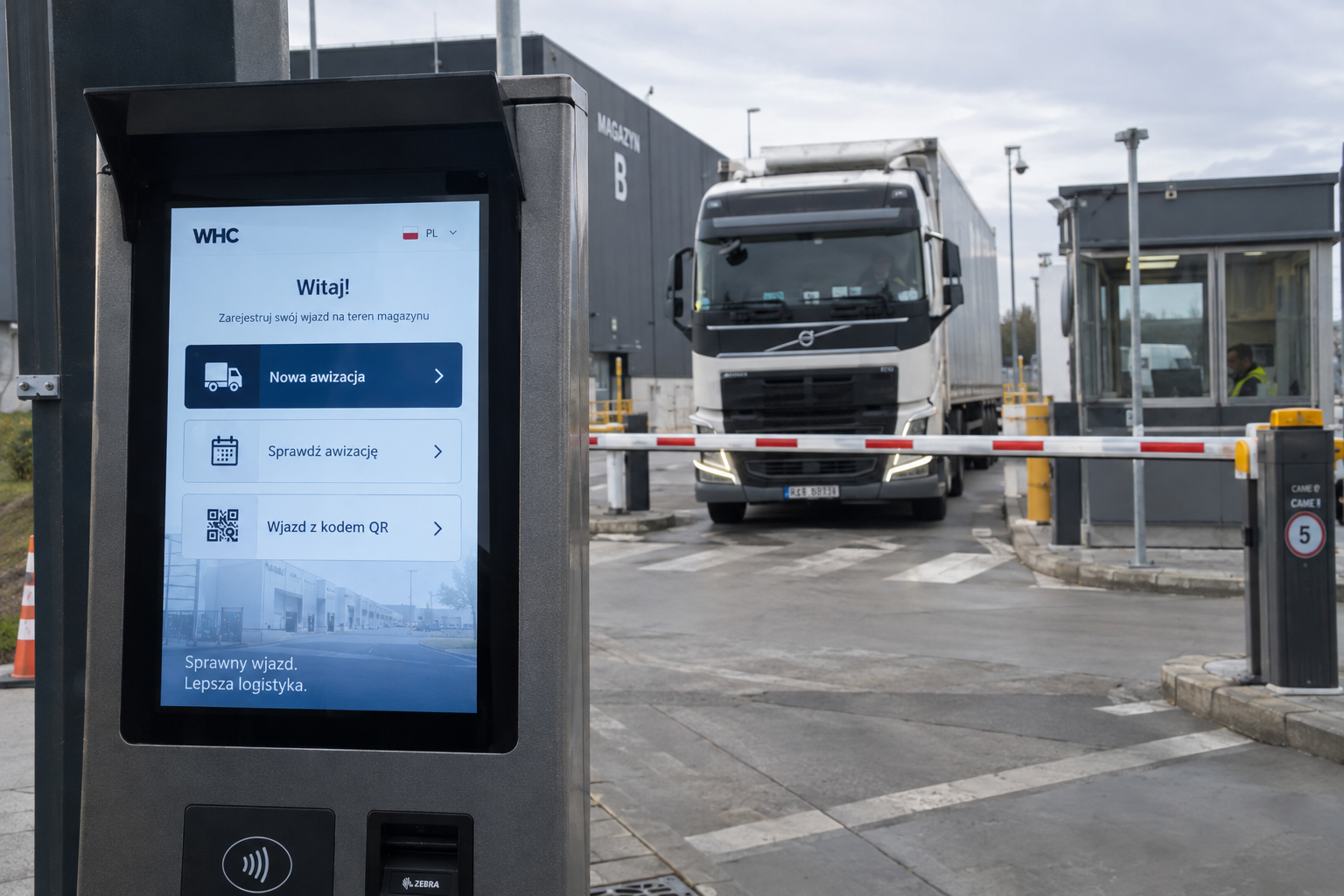
Check-in kiosk — the driver reports with a PIN or QR code
- Security gate view — appointments grouped into scheduled, waiting, on site and completed, with a one-click status change.
- Check-in kiosk — the driver enters a PIN or scans a QR code, and the system verifies the appointment and logs the arrival.
- ANPR cameras and barriers — a booked truck enters unattended once the plate is recognised, an unbooked one is stopped.
- TV screens with the queue — the hall and the yard can see who is next at which dock, in large type and refreshed automatically.
- Warehouse operator kiosk — the start and end of an operation confirmed with a touch of the screen at the dock.
- E-mail, SMS and in-app notifications — about a new appointment, a rescheduled slot, a comment or an upcoming transport.
WHC talks to your ERP, WMS and TMS — and the API costs nothing extra
A separate system you have to copy data into is just the same problem in a new place. That is why the full REST API is part of the license, and the most common integrations are ready and proven in production.
Ready-made integrations
Microsoft Dynamics 365 Business Central (sales and purchase orders with lines), Google Sheets and Excel in SharePoint, courier companies (DPD, DHL, UPS, GLS, InPost, Pocztex, Orlen Paczka), Allegro returns, an SMS gateway and your own SMTP server.
We switch them on during the rollout, with no integration written from scratch.REST API included in the license
You generate the API key yourself in the settings, separately for each user, so it is always clear which integration changed what. You can handle appointments, orders and users, and incremental synchronisation comes down to one request for everything that changed since the last pull.
No extra fees for access to your own data.Consistent statuses across systems
Every appointment and order status can carry its own external identifier, so the stages of the process in WHC map exactly onto the statuses in your ERP or TMS. A missing integration is either delivered as part of the rollout or built by you on the API.
Both systems describe the same transport in the same language.A price that fits into an operational budget
We do not sell six-figure implementations. You pay a monthly subscription based on the number of dock doors and the license period you choose.
The rate for an annual license and one dock door. The calculator prices additional docks and shorter periods, and also shows PLN and EUR.
- Remote staff training and your logo inside the system.
- An unlimited number of users — you do not pay per supplier or per warehouse operator.
- No device limit — computers, phones, kiosks and screens on the shop floor.
- Hosting, backups and updates in the cloud option.
- Support as standard and the REST API at no extra charge.
You do not have to take our word for it
Nobody buys a dock scheduling system based on a page of copy. So we leave evidence you can verify independently of us — a ranking, a customer list and public reviews.
In the "Ranking systemow awizacji kierowcow 2026" (IRL Labs driver appointment system ranking) the WHC Dock Scheduling System came first with a score of 77/85 points, named as the solution with the best capability-to-price ratio on the Polish market.
Who already runs on WHC
The system is used by large manufacturing plants and brands you know from the shelf, as well as by smaller warehouses handling a dozen or so arrivals a day. Among them Empik, Michelin, Siemens, Baumit, Inter Cars and Smay.
More than 2000 active users and over 100k appointments created.Public reviews of our work
You will find reviews of BC Software on Google — including the ones where customers say outright what did not go perfectly at the start and how quickly it was fixed. We do not hide them, because our response time is a genuine differentiator.
Eight years on the market and a recommendation from the Poznan Science and Technology Park.“I recommend this company, cooperation was very good. They adjusted the product to my requirements, communication and deadlines were excellent. Thanks to managing the warehouse from a phone, our staff work far more efficiently.”
“Highly recommended, everything was done exactly as I wanted. The software was delivered fast, tested, with no bugs. Communication with the company was very good.”
You argue with numbers, not impressions
Dock scheduling is not only about order in the yard. It is also the first point at which your process starts generating data. After a few weeks you have material for a conversation with your carriers, your board and your own team.
Actual operation times
The system measures the intervals between statuses: from arrival in the yard, through entry onto the dock, to the end of the operation. You can see where the minutes really go and which dock is the bottleneck.
You optimise what is measured, not what somebody assumes.Reports and export to Excel
Average unloading time, a list of the suppliers who are late most often, month-on-month and year-on-year comparisons of appointment volumes. Every data set exports to a spreadsheet and drops straight into your own report.
Ready-made arguments for renegotiating terms with carriers.Full history and audit trail
Every change to an appointment field is recorded with the author, the time and the values before and after. Late arrivals and no-shows are logged automatically, so settlements rest on a record rather than on memory.
No more disputes about who changed a delivery date, and when.If a feature is missing, we simply build it
We are the producer of this software, not a reseller of somebody else's license. If your process needs something that does not exist today, we quote it feature by feature and deliver it.
A quote you can trim
You receive a cost estimate broken down by individual features, so out of eight ideas on the table you can pick the three that matter most and come back to the rest later. A quote commits you to nothing.
You stay in control of the budget and the order of work.You talk to the people who built the system
Tickets go to the people who know this codebase, not to an external call centre. We are a Polish software producer based in Poznan, working in the European time zone, in English and in Polish.
A quick decision and a quick fix, with no chain of handovers.The questions we hear most often
What is the WHC Dock Scheduling System?
How long does the WHC rollout take?
Does the WHC Driver Appointment System also handle loading and collections?
How much does the WHC Dock Scheduling System cost?
How can I test the system before deciding?
Will my suppliers actually want to use it?
Where is the data stored and how is security handled?
Will WHC integrate with our ERP, WMS or TMS?
How does AI support dock appointments in WHC?
Can I walk away once the license period ends?
See the WHC Dock Scheduling System in action
Open the demo in your browser, or ask for a private environment configured around your warehouse. Both are free and neither requires any purchasing decision.
Prefer to talk? Call us: +48 792 232 902 · biuro@bcsoftware.pl